Telviva Mobile User Guide
Download and Login
- Download the Telviva Mobile application in the Apple App Store or Google Play Store.
- Once you have successfully downloaded the application, open it and click on the Start button.
Telviva Mobile Log in screen
- Log in with your Telviva One username and password.
Telviva Mobile Log in options
- Or log in with a code and your Telviva One web application.
Telviva Mobile Log in by code
- To log in by code, open Telviva One on your browser (one.telviva.com) and click on the User icon in the top right hand corner. This will open up the dialer and configuration options. Click on Settings, and then Activate Telviva Mobile.
- Once you have clicked on Activate Telviva Mobile, you will have the option to enter the code displayed on your mobile device and click on the button to activate.
Activate Telviva Mobile
Telviva Mobile Activated
- Once logged in, you will be prompted to allow for the relevant Operating System permissions.

Note
- Depending on your device, you will be prompted for permissions to access the microphone, your contacts etc.
- Set the contacts permission and allow Telviva Mobile to use your calling accounts.
- Set the microphone access to allow Telviva Mobile to use your audio on your mobile device.
Making Calls
- Click on the 'dialer' icon in the middle of the bottom toolbar. This will open the dialer, which will allow you to enter the number or extension of the party you would like to call.
- Enter the number to dial:
- You are also able to search by name using your keyboard.
In-Call Actions
While in an active call session, you will have access to the following features/functions:
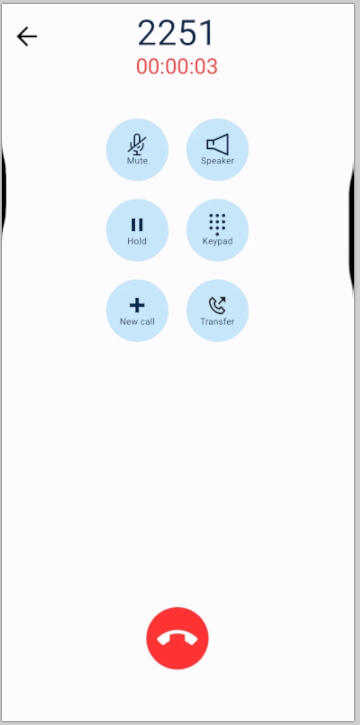
- Mute: This allows you to unmute/mute yourself while in a call
- Speaker: This allows you to toggle audio between normal and speaker
- Hold: This allows you to place the other party on hold
- Keypad: This is used when within an IVR, and an option needs to be selected eg. Press 1 for Sale, Press 2 for Service
- New Call : This places the current call on hold and allows you to make an additional call, you can then merge/confernce the calls
- Transfer: This will give you the option for an attended and unattended transfer
Attended transfers let you speak to the 3rd party before completing the transfer while the caller is on hold.
Unattended will immediately transfer the call to the 3rd party and terminate the call on your end.